Point of Sale & Business OperationsInventory & Purchasing
Product Detail
A product's full record — pricing, stock, movement history, and profit analytics.
Shows a product's full record: info, pricing, current stock, its recent movement history, and — if you have financial-reporting access — its profit analytics.
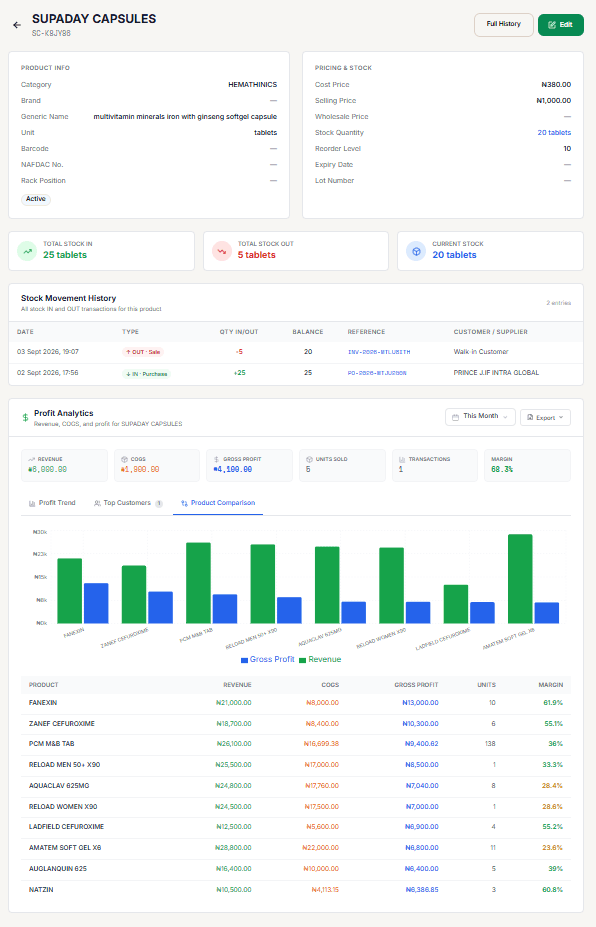
Reading the screen
- Product Info — Type (Simple, Service, Assembly, or Variable), Category, Brand, Generic Name, Unit, Barcode, NAFDAC No., plus Rx Required / Controlled / Active badges. Rack Position is omitted for Service and Variable products. A variation shows a "Variation of ..." link back to its parent Variable product.
- Pricing & Stock — Cost Price, Selling Price, Wholesale Price. Stock Quantity, Reorder Level, Expiry Date, and Lot Number are also shown, except for Service and Variable products — none of them apply to a non-stock item (an Assembly product still shows all of these; it has its own real stock like a Simple product).
- Total Stock In / Total Stock Out / Current Stock — three at-a-glance summary cards. Not shown for a Variable parent, which has no stock movement of its own.
- Stock Movement History — the most recent 50 entries inline, each with a clickable reference linking straight to the originating sale or purchase. More than 50 shows a View all N entries link to the full Product Stock History page. Not shown for a Variable parent.
- Variations — shown only for a Variable parent, in place of the sections above: the list of its variations (each with its own price and stock) and an Add Variation button to add another one without recreating the whole product family. See Add Variable Product.
Profit Analytics
Not shown for a Variable parent (it's never sold directly, so it has no sales to analyze) — view profit analytics on each variation's own Product Detail page instead.
Requires the pos:report:financial permission — without it, this section shows "No sales data for this period" rather than being hidden outright.
Pick a period, then read:
- Revenue, COGS, Gross Profit, Units Sold, Transactions, Margin — six summary cards. A loss (negative Gross Profit) shows a dedicated red warning banner.
- Profit Trend — a Revenue/COGS/Gross Profit bar chart across the period.
- Top Customers — who bought this product, by revenue.
- Product Comparison — this product plotted against others, with itself highlighted (THIS) in the table.
An export menu next to the period selector exports the trend data.
Editing
Edit opens the same form as Add Product, pre-filled. Full History opens Product Stock History directly.