Add Product
Add a new product to your inventory, with pharmacy-specific fields like NAFDAC number and prescription requirement.
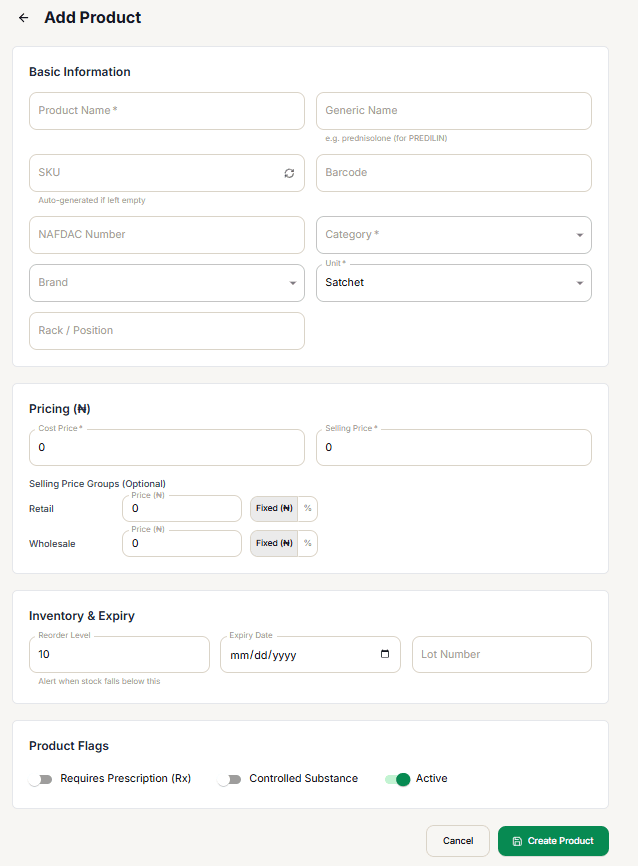
Basic Information
Product Name is the only required field here. SKU auto-generates if left empty (or select the refresh icon to generate one on demand); Barcode, NAFDAC Number, Brand, and Rack / Position are all optional. Category and Unit are required.
Product Type chooses between Simple (a standard stock-tracked product — the default), Service (a non-stock item, e.g. a consultation or delivery fee — sold at a price, but with no quantity, expiry, or lot number to track), and Assembly (a bundle of other products sold as one line item — see the Components step below). It does not include Variable — a Variable product (one with variations, like different pack sizes or strengths) is created from its own dedicated form; see Add Variable Product below.
Pricing
Cost Price and Selling Price are both required. Below them, Selling Price Groups (Optional) lists every group you've configured (see Selling Price Groups) — for each one, enter a price and choose Fixed (₦) or %. A percentage is applied against this product's Selling Price (e.g. 90% of a ₦1,000 selling price stores as ₦900 for that group), not a separate flat number.
Inventory & Expiry
Not shown for Service products. Reorder Level defaults to 10 and triggers a low-stock flag once stock falls below it. Expiry Date and Lot Number are optional.
Components — Assembly products only
Only shown when Product Type is Assembly. Search for existing products and add them to the bundle with a quantity each — this list is for display and labeling only. An Assembly product keeps its own independent stock, cost, and selling price (set in the Pricing and Inventory & Expiry steps above, same as a Simple product); selling it never touches the stock of the products listed as its components.
Product Flags
Three toggles: Requires Prescription (Rx), Controlled Substance, and Active (on by default).
There's no per-location stock field or VAT-exempt toggle on this form — a product's starting stock is set separately (via Add or Edit Opening Stock from the Products List's Actions menu, or a purchase), and there's no VAT-exempt flag on the product record at all.
After adding
The product is immediately available at checkout and in inventory reports. A Service product is always available for sale regardless of "stock" — it never shows as out of stock at checkout — and it's automatically left out of the Low Stock and Expiring Products reports and the Stock Report tab on Products List, since none of those apply to a non-stock item. An Assembly product behaves exactly like a Simple product in every one of those reports — its own stock is tracked and reported normally; only its component list is special.
Add Variable Product
Use this when the same product comes in more than one size, strength, or pack — e.g. "Paracetamol" as both a 500mg and a 1000mg pack. Reach it from the sidebar (Products → Add Variable Product, right below Add Products) — it's a separate form from the one described above, not an option in the Product Type dropdown.
Product Family
Fill in the shared details once: Product Name, Generic Name, NAFDAC Number, Category, Brand, Unit, and the Requires Prescription (Rx) / VAT Exempt toggles. This becomes a non-sellable "container" — it has no price, barcode, or stock of its own; those live on each variation instead.
Variations
Add at least 2 variations (use + Add Variation for more). Each variation gets its own Variation label (e.g. "500mg"), SKU (auto-generated if left empty), Barcode, Cost Price, Selling Price, Opening Stock, and Reorder Level — it becomes its own real, independently sellable product under the hood, named "<Product Name> - <Variation label>" (e.g. "Paracetamol - 500mg").
After creating
The parent ("Product Family") never appears as something a customer can buy directly — attempting to sell or return it directly is blocked with an explicit error. At checkout, tapping its tile in the POS Checkout Screen grid shows "Choose variation" instead of a price, and opens a picker listing each variation's own price and stock; the customer's cart line item is always a specific variation. On Products List and Product Detail, the parent is marked with a Variable badge and shows "— (per variation)" instead of a single price/stock figure; each variation's own Product Detail page links back to its parent ("Variation of ..."). Like Service, a Variable parent is excluded from the Low Stock, Expiring Products, and Stock Report views — it has no stock of its own to report; its variations are included normally, since each is a real stock-tracked product. Deleting the parent also removes all of its variations.
To add more variations to an already-created Variable product later, open its Product Detail page and use Add Variation there — you don't need to recreate the whole family.