Void a Sale
Cancel a finalized sale, with a required reason and inventory restore.
Voiding cancels a completed sale — the correct action when a finalized sale needs to be undone, since finalized sales can't be deleted.
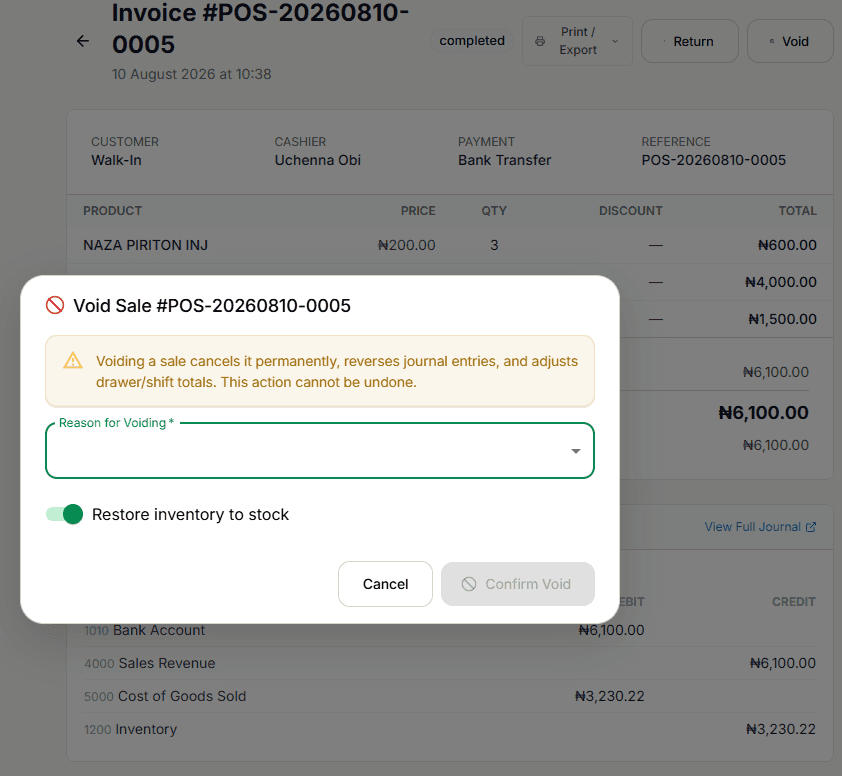
This cannot be undone. Voiding permanently cancels the sale, reverses its journal entries, and adjusts the drawer/shift totals for that day.
Select Void
From Sale Detail & Receipt, select Void (only shown for a completed sale).
Give a reason
Reason is required (3–500 characters) — a real justification is enforced, not just a formality.
Decide whether to restore inventory
Restore inventory to stock is on by default, turning the sold stock back into available inventory. Turn it off only if the stock genuinely shouldn't come back (e.g. it was damaged or already disposed of).
Confirm Void
Select Confirm Void.
When you can't void
- A sale that's already voided — "Sale is already voided"
- A return transaction itself — "Cannot void a return transaction"
- A sale that's already been refunded — "Cannot void a refunded sale"
- A sale that already has a linked return — "Cannot void a sale with an existing return"; process or reverse the return first
Permission
Requires the void-specific permission, separate from general sale creation/editing.