Quotations (Add & List)
Give a customer a price quote without committing it as a sale.
A quotation is a price you can hand to a customer without it counting as a completed transaction or affecting stock — stock levels are never checked or reduced for a quotation's items.
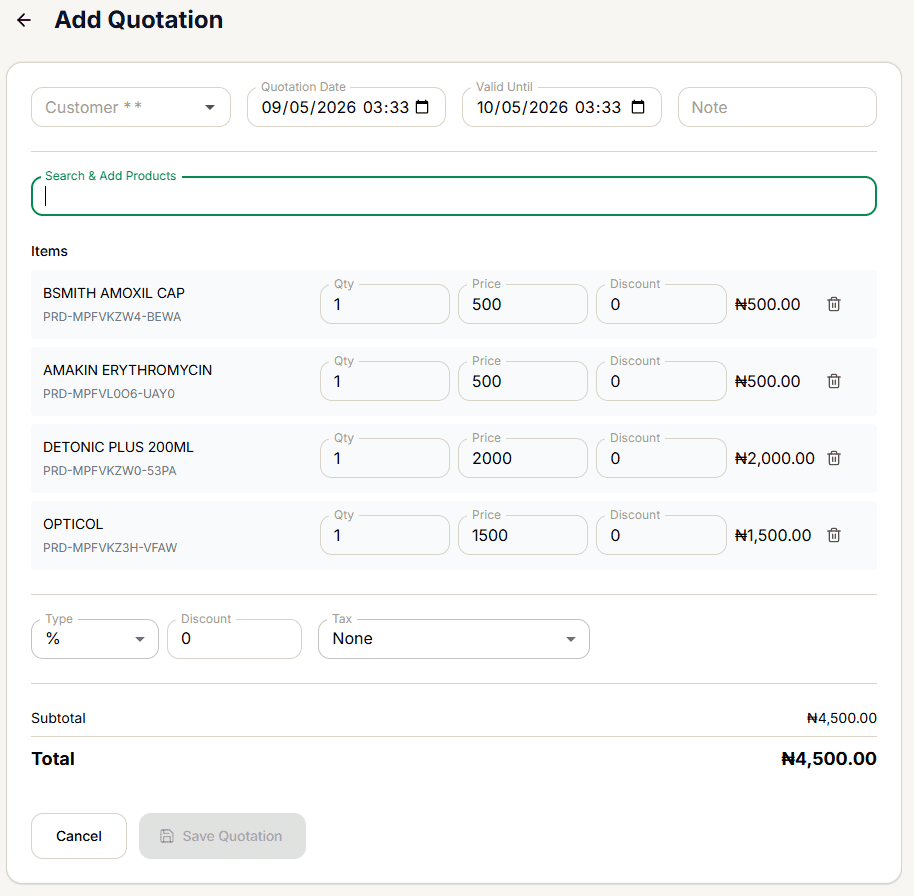
Creating one
Same item-entry flow as a draft, with two differences:
- Customer is required — Save Quotation stays disabled until both a customer and at least one item are present.
- Valid Until defaults to 30 days from today.
Quotations created here currently don't appear in the Quotations list below. The list filters strictly by a type: quotation field, but the Add Quotation form never sends a type at all — so the sale is saved with the system default, type: sale, instead. The quotation still exists (findable in the main Sales List, shown as an ordinary unpaid sale with no marker that it was meant to be a quotation), it just won't show up here. This is a confirmed gap in the current build, not something you're doing wrong.
Finding your quotations
The list shows each quotation's invoice number, a Quotation chip, a Valid until chip (turns red once expired), customer, item count, total, and date — searchable by invoice number or customer.
Converting to a real sale
Convert finalizes it immediately as a fully-paid cash sale for the exact quoted total — the same instant, non-interactive behavior as converting a draft. If the customer is paying differently, don't use Convert.
Edit doesn't pre-fill the form. Unlike a draft's Edit, selecting Edit from the ⋮ menu opens a blank Add Quotation form rather than loading the existing quotation's data — a second confirmed gap, separate from the one above.
Removing one
See Deleting a Draft or Quotation — quotations follow the same soft-delete rule as drafts.