Point of Sale & Business OperationsPoint of Sale, Sales & Till Management
Discount Detail
A discount rule's full configuration and usage.
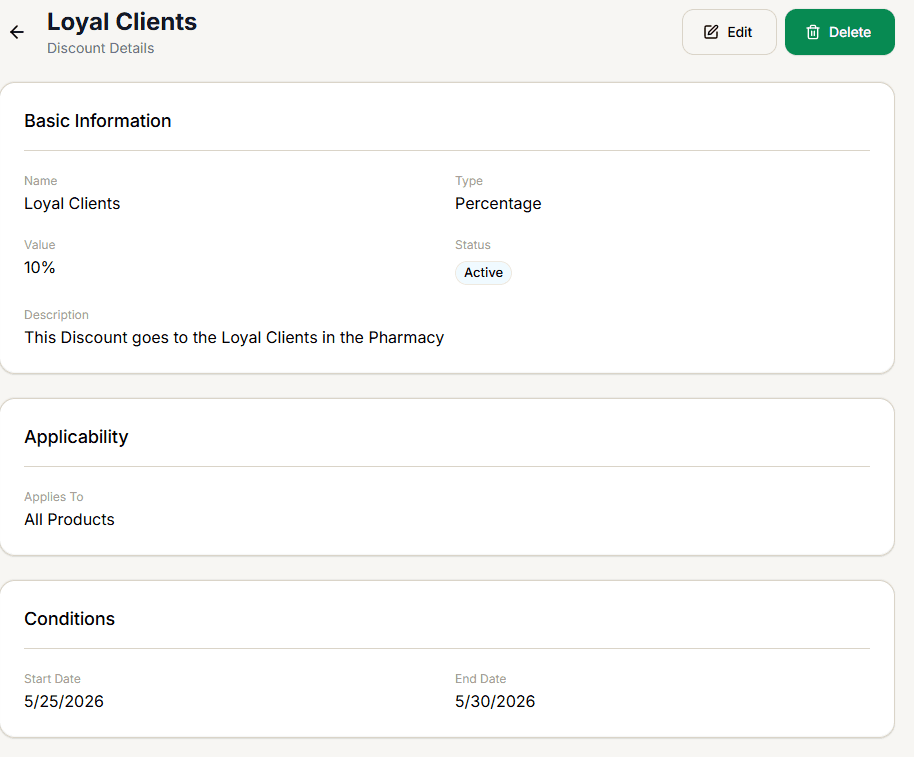
Shows a discount's full configuration — type, value, scope, and any conditions — read-only, with Edit and Delete actions.
Sections
- Basic Information — Name, Type (Percentage / Flat Amount), Value, Status, and Description (if one was set).
- Applicability — what it applies to (All Products / Specific Categories / Specific Products / Customer Group). For a customer-group discount, the group's name is shown here too.
- Conditions — only appears at all if at least one condition was actually set: Minimum Purchase Amount, Maximum Discount Amount, Usage Limit, Start Date, and/or End Date.
For a category- or product-scoped discount, this page shows the scope type but not which specific categories or products were selected — open Creating & Editing a Discount in edit mode to see the actual selection.
Editing or deleting
Edit opens the same form as Creating & Editing a Discount, pre-filled.
Delete here has no confirmation — unlike deleting from the Discounts List, which asks "Delete Discount?" first, selecting Delete on this page removes it immediately.